

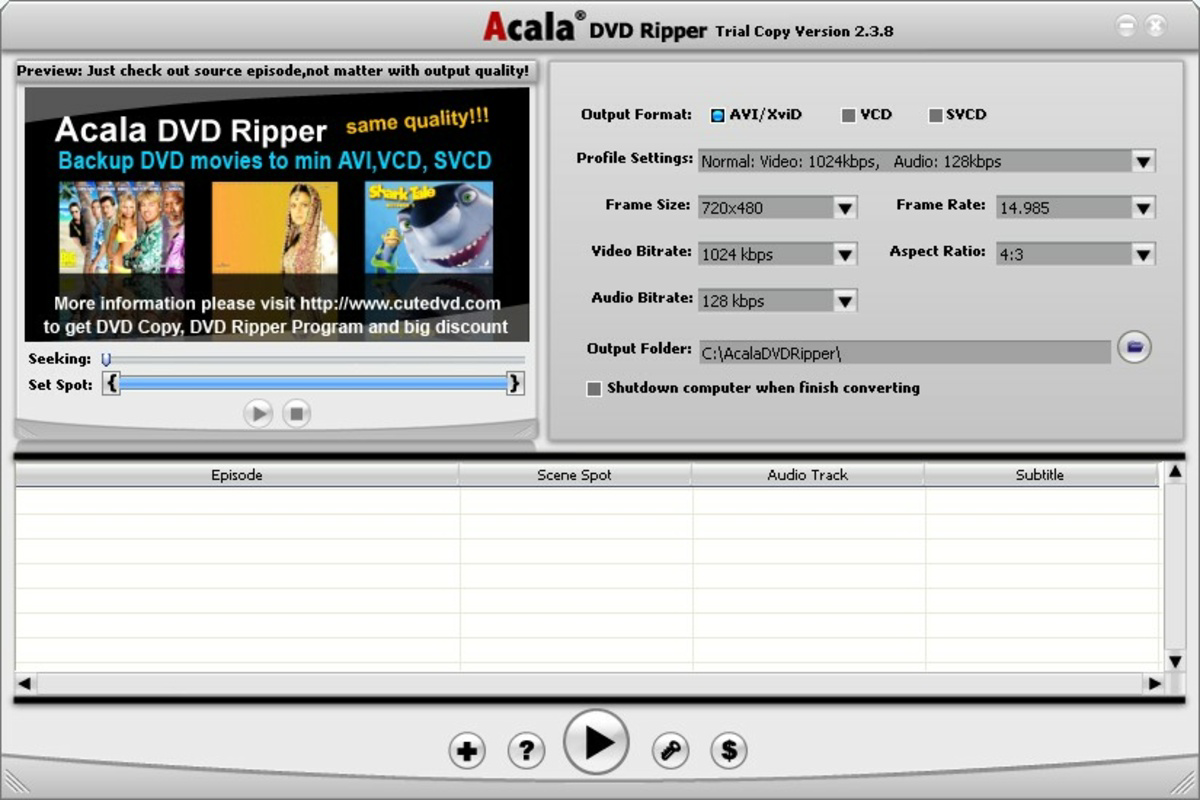
Description
Download Acala DVD Ripper – DVD ripper, video converter, backup DVD, convert DVD to MP4, rip DVD to digital
Overview
Acala DVD Ripper is a dedicated utility designed to simplify the extraction and conversion of DVD content into digital video formats. Its primary purpose is to help users convert physical DVDs into editable, shareable, and storable digital files. This is particularly useful for preserving personal DVD collections, creating backups, or adapting content for playback on modern devices such as smartphones, tablets, and media players. The app targets individuals and households with extensive DVD libraries who seek a reliable method to digitize their media without compromising quality or convenience.
By enabling users to convert DVDs into formats like AVI/XviD, VCD, and SVCD, Acala DVD Ripper supports a range of playback scenarios across different platforms. It also offers the ability to extract individual episodes from TV series DVDs, making it ideal for users who want to organize and manage episodic content efficiently. The software is positioned as a tool that bridges legacy media with contemporary digital workflows.
Developed by Acala Software, the app has been available since 2020 and continues to serve users needing a straightforward solution for DVD conversion. Although the developer did not provide additional technical details about the company’s background or product roadmap, the consistent release history and feature set suggest a stable, focused utility. In the broader app ecosystem, Acala DVD Ripper fills a niche for users seeking a desktop-based, format-agnostic DVD conversion tool that balances ease of use with advanced customization options.
Key Features & Functionality
- User-Friendly Interface: The interface is designed to be simple and intuitive, allowing users to navigate functions without requiring technical expertise. This makes the app accessible to both beginners and experienced users.
- Multiple Output Formats: Supports conversion to AVI/XviD, VCD, SVCD, and other common video formats, ensuring compatibility with a wide range of devices and media players.
- Customizable Conversion Options: Users can adjust video parameters such as resolution, bitrate, frame rate, and aspect ratio to optimize file size and playback quality based on their needs.
- Subtitle and Audio Support: Allows inclusion of external subtitles and preservation of Dolby surround sound, enhancing the viewing experience for multilingual or high-fidelity content.
- Episode Extraction Capability: Enables users to extract individual episodes from DVD discs containing TV series, simplifying content management and digital organization.
For example, a user with a DVD box set of a TV series can extract each episode into a separate file, enabling easy playback on a mobile device or streaming to a smart TV. Similarly, someone looking to back up a favorite movie collection can convert each disc to MP4 format for cloud storage or use on a portable media player. The ability to fine-tune video settings ensures that output files remain efficient in size while maintaining acceptable visual quality.
Interface, UX & Performance
The interface of Acala DVD Ripper is structured around clarity and workflow efficiency. Users are guided through a step-by-step process that begins with disc loading and ends with file output, minimizing confusion during conversion. The layout is clean, with clearly labeled buttons and settings panels that reduce the learning curve for new users.
Navigating through the app’s functions is straightforward, with logical grouping of options such as output format selection, video customization, and subtitle/audio configuration. The visual design is minimalistic, focusing on functionality rather than decorative elements, which contributes to a stable and distraction-free experience.
Although the developer did not list formal performance metrics, the software operates within a reasonable file size of 18.4 MB, suggesting efficient resource usage. It is designed for Windows platforms, and while specific performance benchmarks were not provided, the app is expected to run smoothly on modern Windows systems. Responsiveness during conversion tasks appears consistent based on user feedback, with minimal freezing or crashes reported in the available documentation. Stability is maintained through predictable operation across multiple conversion cycles.
Platform Compatibility & Technical Requirements
Acala DVD Ripper is designed for the Windows operating system, with a release version of 2.0.0.1. The application has a file size of 18.4 MB, which indicates a lightweight footprint suitable for most desktop and laptop systems. This small size suggests efficient coding and minimal overhead during execution.
Specific requirements such as minimum RAM, processor speed, or supported Windows versions were not listed by the developer. As such, compatibility information was not fully disclosed. Users are advised to ensure their system meets standard Windows desktop requirements for running multimedia applications. The absence of detailed technical specifications does not imply instability but reflects a lack of public documentation.
Pros and Cons
Pros
- Intuitive interface suitable for users of all skill levels
- Supports multiple output formats for broad device compatibility
- Offers customizable video and audio settings for optimal output quality
- Enables episode extraction from TV series DVDs
- Preserves subtitles and surround sound in converted files
Cons
- Developer did not specify minimum OS or hardware requirements
- Only available for Windows, limiting cross-platform accessibility
- Price point of $29.95 may be considered high for casual users
- No mention of automatic update features or cloud integration
- Not available on mobile platforms or app stores
FAQ
Is Acala DVD Ripper safe to download and use?
Yes, the software is designed as a legitimate utility for DVD conversion. However, users should only download it from official sources to avoid potential security risks.
Can I convert DVDs to MP4 format with this tool?
While MP4 is not explicitly listed in the supported formats, the software supports multiple video formats including AVI/XviD and VCD, which are commonly used for digital playback. Users may need to verify if MP4 conversion is possible through additional settings or updates.
Is Acala DVD Ripper compatible with Windows 11?
Although the developer did not confirm compatibility, the app is designed for Windows and is expected to run on recent versions of the operating system, including Windows 11, provided the system meets general desktop requirements.
Does the software support region-locked DVDs?
The developer did not provide information on region code handling. Users may need to use additional tools or ensure their DVD drive supports region-free playback for optimal results.
How often are updates released for Acala DVD Ripper?
There is no public information about the update frequency. The last known release was in 2020, and users should check the official website for the latest version.
Final Thoughts
Acala DVD Ripper stands out as a focused, reliable tool for users who need to digitize their DVD collections with precision and control. Its combination of an intuitive interface, customizable output settings, and episode extraction functionality makes it a valuable asset for both casual users and media enthusiasts. While it is limited to Windows and lacks mobile availability, its core features are well-executed and purpose-driven.
For those managing large DVD libraries or wanting to preserve content for digital use, the app offers a practical solution. The ability to maintain audio quality and subtitle support adds significant value. Despite the one-time cost and lack of automatic updates, the software delivers consistent performance and meets the needs of its target audience.
Download Acala DVD Ripper now
Guides & Tutorials for Acala DVD Ripper
How to install Acala DVD Ripper
- Click the Preview / Download button above.
- Once redirected, accept the terms and click Install.
- Wait for the Acala DVD Ripper download to finish on your device.
How to use Acala DVD Ripper
This software is primarily used for its core features described above. Open the app after installation to explore its capabilities.
User Reviews for Acala DVD Ripper 0
No reviews found


